Pixel density: the sum that decides what a camera can see
Short answer
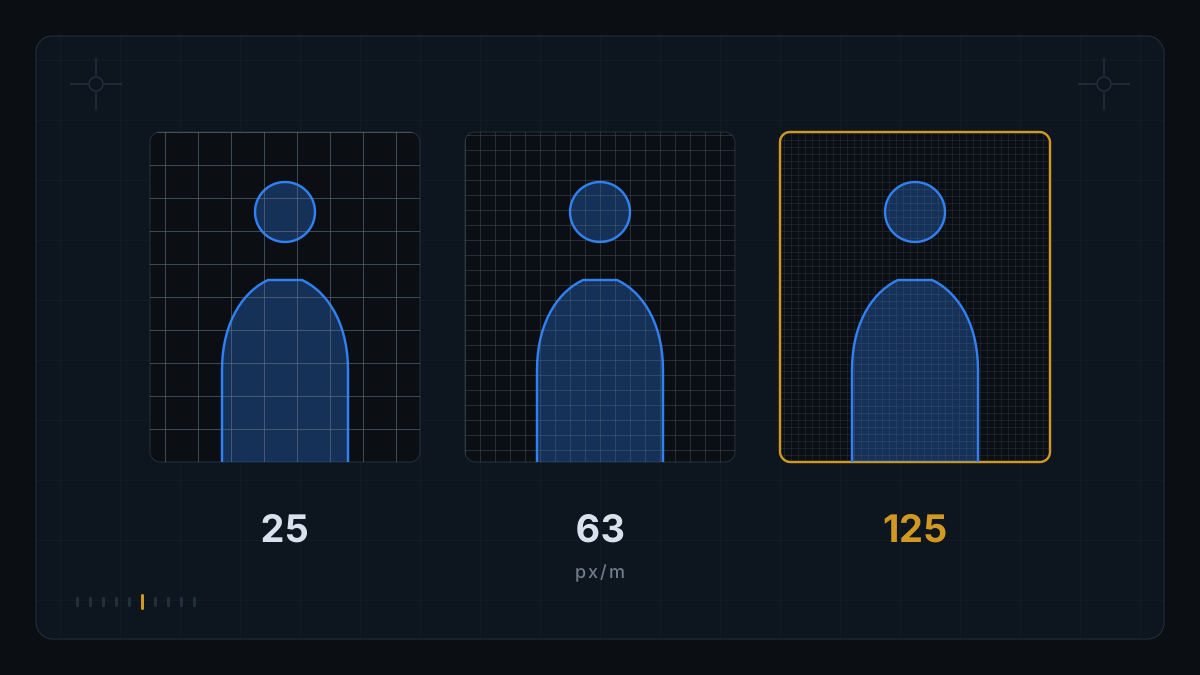
Pixel density is how many pixels of the image cover one real meter of the scene. The standard IEC 62676-4:2014 ties four operational objectives to four density levels: 25 px/m to detect, 63 px/m to observe, 125 px/m to recognize and 250 px/m to identify a person.
The sum is a division: horizontal pixels divided by the width, in meters, of the slice of scene the camera frames. A camera 1920 px wide framing 20 m of road delivers 96 px/m — enough to detect and observe, not enough to recognize. High resolution over a wide frame does not buy detail.
In this piece
Pixel density is not resolution: it is resolution divided by scene
Cameras are sold in megapixels; a monitoring project is settled in pixels per meter. Confusing the two quantities is the most common reason a new camera fails to solve an old problem.
Resolution is a property of the sensor. Pixel density is a property of the installation: it depends on resolution, lens, distance and framing. The same 4 MP camera has detail to spare on a 3 m gate and almost none across a 60 m yard. The sensor did not change; the scene did.
Where do the 25, 63, 125 and 250 px/m come from?
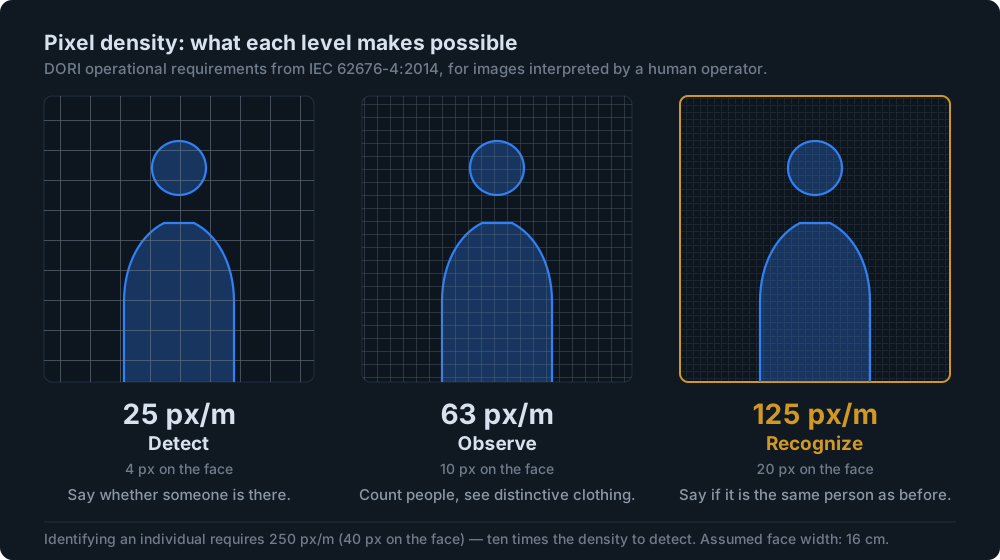
The model starts from the human face. The standard asks how many pixels have to span the width of a face to meet each objective: 4 to detect that someone is there, 10 to observe characteristics, 20 to recognize someone seen before, 40 to identify. With the average face width assumed at 16 cm, each per-face figure converts straight into a per-meter figure.
| Objective | Px per face | Px per meter | What becomes possible |
|---|---|---|---|
| Detect | 4 px | 25 px/m | Determine whether or not someone is present. |
| Observe | 10 px | 63 px/m | Count how many people are there and see characteristics, such as distinctive clothing. |
| Recognize | 20 px | 125 px/m | Decide whether the person shown is the same one the observer has seen before. |
| Identify | 40 px | 250 px/m | Identify an individual. |
Because of that jump, “the camera saw the car go past” and “the camera identified who was driving” are requirements for different projects, with different lenses and often with different cameras in the same position.
How many meters of scene does my camera cover?
That figure is not in the datasheet: it is on the wall. Frame the scene the way it will sit in operation, put an object of known width at the point of interest — a tape measure opened to 1 m will do — and see what fraction of the image width that meter takes up. If 1 real meter takes up a tenth of the image, the density is a tenth of the horizontal resolution.
| Framed scene | Density | Highest objective reached |
|---|---|---|
| 4 m | 480 px/m | Identify |
| 8 m | 240 px/m | Recognize |
| 15 m | 128 px/m | Recognize |
| 20 m | 96 px/m | Observe |
| 30 m | 64 px/m | Observe |
| 40 m | 48 px/m | Detect |
| 77 m | 25 px/m | Detect (at the limit) |
Two practical readings come out of that table.
- Resolution buys little once the frame widens. Going from 1080p to 4K doubles the density in the same frame; widening the frame by a factor of two gives the whole gain back.
- Recognition caps the frame. At 1920 px wide, the usable frame for recognition sits around 15 m. Covering 40 m of road with a single camera is a decision about detection — worth writing into the project before someone demands recognition from the recording.
Density is not uniform across the frame: it is highest at the center and falls toward the edges, from lens distortion and from the angle at which the scene is seen. The DORI distance figures published in datasheets use the center of the image as the reference. If the point of interest in your project sits in the corner of the frame, the real density there is lower than the datasheet figure.
Does DORI apply to AI, or only to the human eye?
The standard is explicit, and almost every commercial document leaves it out: the operational requirements apply to situations in which the images are interpreted by human operators. Video analysis carried out by software falls under other definitions, and thermal cameras use a set of requirements of their own.
Two consequences. DORI is still the best public yardstick for sizing a project. And it is not a certificate that a detector will work: a model can fail with density to spare — poor contrast, a partly hidden target, motion too fast for the frame rate — and succeed with tight density in a clean scene. Pixel density is a necessary condition, not a sufficient one.
That is why the acceptance criterion for a system with AI is measured in the real scene. The spreadsheet says whether it is worth trying; the field test says whether it works.
Licence plates add a constraint on angle
In plate reading, geometry weighs as much as density. Application note AN033 from Eagle Eye Networks, on installing cameras for LPR/ANPR, is direct on two points: the pan angle should be kept to 30 degrees, because perspective beyond that hurts the read; and the camera should always be tilted downward, to keep sun and headlights off the lens and to let rain run off the glass.
The reason is geometric. A plate seen from the side projects onto the image a width smaller than its physical width: the same pixels now cover more millimeters of plate, and the effective density drops without anyone having touched the lens. Angle is lost density in disguise — and when the thing being measured is speed, that loss turns into uncertainty in the final number, as we show in measuring speed from video.
At OpenRadar this sum is the first thing we run before saying that a camera is good for anything: framing, density at the point of interest and angle, camera by camera. When the geometry does not add up, the diagnosis is that it does not add up — it is cheaper to find that out in a report than at an HOA meeting.
Does video compression erase the pixel density the sensor had?
It does not erase the density — it erases the detail inside it, which is what matters. Axis itself records that light direction, optical quality and compression affect the result, and that the density model is a simplification of a complex reality.
There is an experimental measurement. A 2022 study evaluated H.264 compression against an object detector (YOLOv5) on 50 surveillance videos, at five quality levels (CRF 22, 32, 37, 42 and 47). Using CRF 37 instead of CRF 22 cut the bitrate substantially with no relevant loss of detection; at higher compression the performance degrades appreciably, above all in complex scenes, with poor lighting and fast-moving targets.
The implication for an existing installation is direct. If the analytics software consumes the secondary stream — configured at lower resolution and bitrate to save network — the density calculated at the sensor never reaches the analyzer. Check which video profile the system receives before arguing about why it is getting things wrong.
How to turn this into an acceptance criterion
Pixel density is useful precisely because it can be verified, and that changes the nature of the conversation: instead of arguing about brand and megapixels, you argue about a number anyone can redo with a tape measure and a division.
The part almost every project leaves out is stating the objective per camera, not per system. “Detect a vehicle present in the gatehouse lane” and “recognize the vehicle” are an order of magnitude apart in density — writing down which of the two that particular camera has to deliver avoids an impossible demand later, when someone asks the recording for something the geometry never promised.
The other is remembering that geometric density does not change with the weather, but usable detail changes a great deal. Late-afternoon backlight, rain, headlights at night: it is the worst case, not the catalog scene, that decides whether the system is trustworthy.
It does not claim that reaching 25, 63, 125 or 250 px/m guarantees the result. The source itself records that the model is a simplification and that there is no guarantee that meeting the rule of thumb satisfies the operational requirement — nor that missing it necessarily rules the requirement out.
It does not claim that the DORI levels apply to automatic detectors. The standard defines them for interpretation by a human operator; for analysis by software, other definitions apply, and this piece does not set them out.
It does not claim what the maximum vertical angle for plate reading is. The source cited prescribes a downward tilt without fixing a value, and we found no verifiable number to quote.
It does not describe any parameter, threshold or calibration procedure used by OpenRadar. Everything here is public standard, geometry and arithmetic.
Sources
- Axis Communications. Pixel density based on IEC 62676-4:2014 (white paper). whitepapers.axis.com/en-us/pixel-density-based-on-iec-62676-4-2014 — PDF version: axis.com/dam/public/53/47/fd/pixel-density-en-US-364241.pdf Source of the 4/10/20/40 px per face and 25/63/125/250 px/m levels, of the 16 cm average face width, of the caveat that the requirements apply to a human operator, and of the observation that the model is a simplification. Consulted on 4 September 2026.
- Eagle Eye Networks. Camera Installation Considerations for LPR/ANPR, Application Note AN033. een.com/docs/app-notes/an033/ Source of the 30-degree limit on the pan angle and of the recommendation to tilt the camera downward. Consulted on 4 September 2026.
- O'Byrne, M.; Sugrue, M.; Vibhoothi; Kokaram, A. Impact of Video Compression on the Performance of Object Detection Systems for Surveillance Applications, 2022. arXiv:2211.05805. arxiv.org/pdf/2211.05805 Source of the effect of H.264 compression on detection with YOLOv5, including the comparison between CRF 37 and CRF 22 and the degradation in complex scenes with poor light and fast targets. Consulted on 4 September 2026.
We work on the IP camera that is already installed: reading the stream, analysis at the edge and evidence signed with SHA-256 that anyone can check on their own. The first step is always the camera-by-camera feasibility assessment — including when the answer is that this particular camera will not do.